|
PicoScope is your complete test and measurement lab in one easy–to–use application.
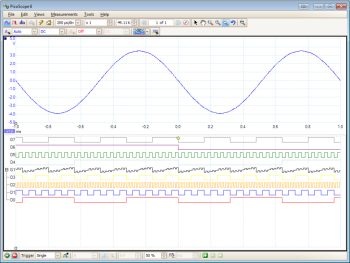
Start PicoScope, click Auto setup and your PC is transformed into a powerful oscilloscope with the timebase and triggering already set up. Click Persistence mode and you can emulate the phosphor display of a conventional analog scope — useful for displaying complex analog signals and spotting glitches. Click Spectrum mode and your PC becomes an FFT spectrum analyzer. And there’s more…
Using the measurements feature in PicoScope you can automatically measure everything from peak–to–peak voltage, to rise time and signal–to–noise ratio. Maths channels can be simple (subtract or add two channel) or as complex as you like with a wide range of advanced maths functions (differentiate, integrate, frequency, average, lin, log, sqrt, etc).
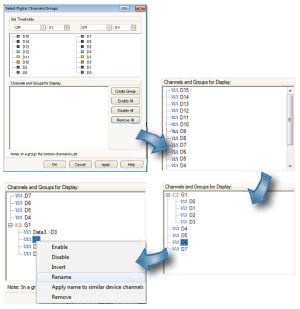
Using PicoScope to measure digital signals is easy: just click the Digital Inputs button and then simply drag–and–drop to add the channels you want to use. You can choose the digital threshold voltage by either selecting a preset (TTL, CMOS, ECL, etc) from a drop–down list or by entering your own values. The digital channels can be arranged into any order, grouped, renamed, and even temporarily disabled.
PicoScope is powerful yet easy to operate. You benefit from the power of the PC, and the familiar Windows interface and controls, making the software easy to learn and easy to use on a daily basis. Data can be saved in a variety of formats including CSV text, PNG and GIF images and MATLAB binary files.
|
PicoScope at a glance
PicoScope 6 includes the following features:
- 10,000 waveform buffer
- Advanced triggering
- Advanced zoom controls
- Arbitrary waveform generator
- Auto–arrange axes
- Auto setup
- Automated measurements
- AWG editor
- CMD–line file conversions
- Continuous streaming mode
- Custom probes
- Digital persistence mode
- Easy data export
- Equivalent time sampling
- Free updates
- Linear interpolation
- Low–pass filtering
- Mask limit testing
- Math functions
- Rapid trigger mode
- Reference waveforms
- Resolution enhancement
- Serial decoding
- Signal generator
- Sin(x)/x interpolation
- Spectrum analyzer mode
- XY oscilloscope mode
|