|
 |
|
|
PicoScope® 6407 High-speed USB digitizer
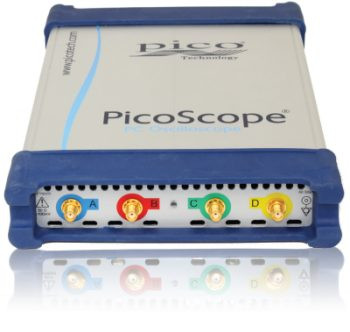
The PicoScope 6407 Digitizer is a compact USB plug-in device that turns your PC or laptop into a 4-channel, high-speed digitizer / PC oscilloscope.
The PicoScope 6407 is a compact USB plug-in device that turns your PC or laptop into a 4-channel, high-speed digitizer. The PicoScope 6407 differs from the rest of the PC oscilloscopes in the PicoScope 6000 series in that it has high-bandwidth 50 Ω inputs with fixed ±100 mV input ranges and SMA connectors. Larger input signals can be accommodated with the use of external attenuators (see accessories).
- 4 channels (fixed ±100 mV)
- 1 GHz bandwidth
- 1 GS buffer size
- 5 GS/s real-time sampling
- Segmented memory / rapid block trigger
- Built-in function generator/AWG
- Drivers and SDK included (Windows, Linux, Mac)
- PicoScope application software included
Best-in-class bandwidth, sampling rate and memory depth
With a 1 GHz bandwidth complemented by a real-time sampling rate of 5 GS/s, the PicoScope 6407 can display single-shot pulses with 200 ps time resolution.
The 1-gigasample buffer on the PicoScope 6407 can hold two 100 ms captures at the maximum sampling rate of 5 GS/s. The PicoScope 6407 is suited to a wide range of high-speed applications including:
- Radar / Lidar / Sonar
- Semiconductor test
- Production line test
- Signals intelligence (SIGINT)
- Physics research
- Medical imaging
- Non-destructive test
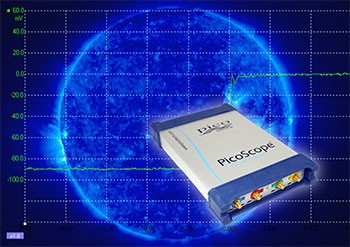
High-speed data acquisition and digitizing
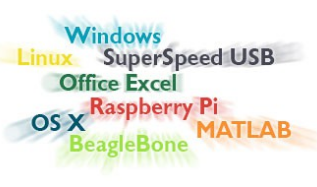
The software development kit (SDK) allows you to write your own software and includes drivers for Microsoft Windows, macOS and Linux (including a beta version for Raspberry Pi).
Example code shows how to interface to third-party software packages such as Microsoft Excel, National Instruments LabVIEW and MathWorks MATLAB.
The drivers support USB data streaming, a mode that captures gap-free continuous data over USB direct to the PC’s RAM or hard disk at rates of over 10 MS/s and capture size is limited only by available PC storage. Sampling rates in streaming mode are subject to PC specifications and application loading.
Advanced digital triggering
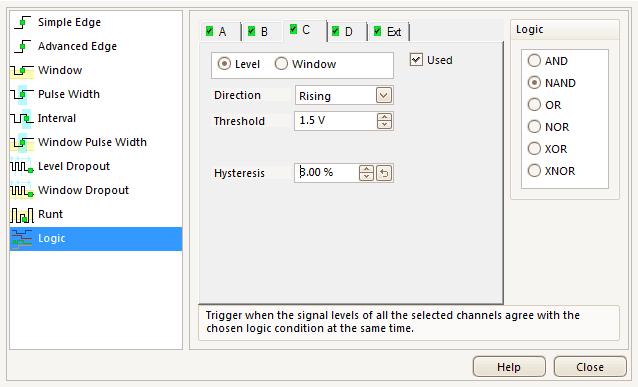
The majority of digital oscilloscopes still use an analog trigger architecture based on comparators. This causes time and amplitude errors that cannot always be calibrated out and often limits the trigger sensitivity at high bandwidths.
In 1991 Pico pioneered the use of fully digital triggering using the actual digitized data. This technique reduces trigger errors and allows our oscilloscopes to trigger on the smallest signals, even at the full bandwidth. Trigger levels and hysteresis can be set with high precision and resolution.
The reduced rearm delay provided by digital triggering, together with segmented memory, allows the capture of a new waveform every microsecond until the buffer is full.
The PicoScope 6000 Series offers an industry-leading set of advanced triggers including pulse width, runt pulse, windowed, logic and dropout.
Arbitrary waveform and function generator
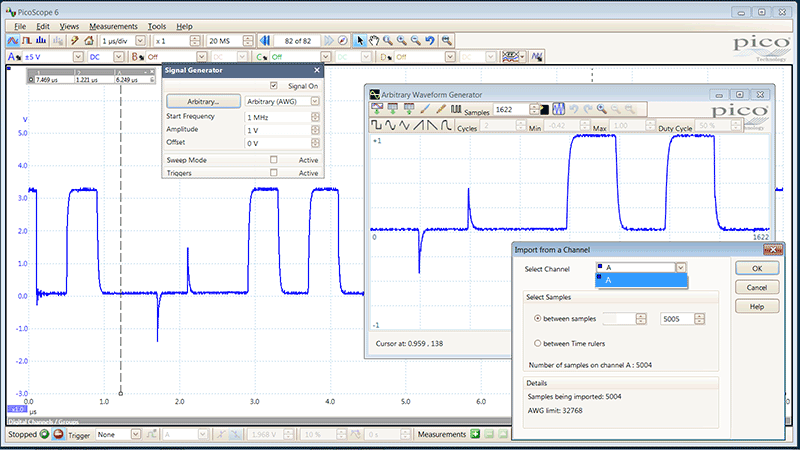
The PicoScope 6407 has a built-in 20 MHz function generator (sine, square, triangle, DC level, white noise, PRBS and others). As well as basic controls to set level, offset and frequency, more advanced controls allow you to sweep over a range of frequencies. Combined with the spectrum peak hold option this makes a powerful tool for testing amplifier and filter responses.
Trigger tools allow one or more cycles of a waveform to be output when various conditions are met such as the scope triggering or a mask limit test failing.
The PicoScope 6407 also includes a 12 bit 200 MS/s arbitrary waveform generator (AWG). AWG waveforms can be created or edited using the built-in AWG editor, imported from oscilloscope traces, or loaded from a spreadsheet.
PicoScope 6407 USB digitizer features
The waveform buffer navigator can quickly highlight waveforms that fail the mask limit test
Mask limit testing
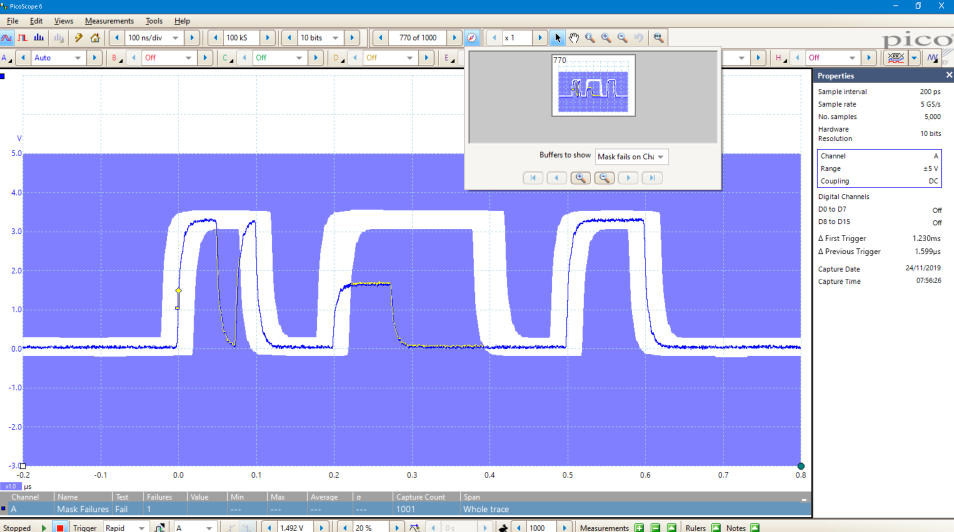
Mask limit testing allows you to compare live signals against known good signals, and is designed for production and debugging environments. Simply capture a known good signal, draw a mask around it, and then attach the system under test. PicoScope will check for mask violations and perform pass/fail testing, capture intermittent glitches, and can show a failure count and other statistics in the Measurements window.
More information on Mask limit testing >>
DeepMeasure
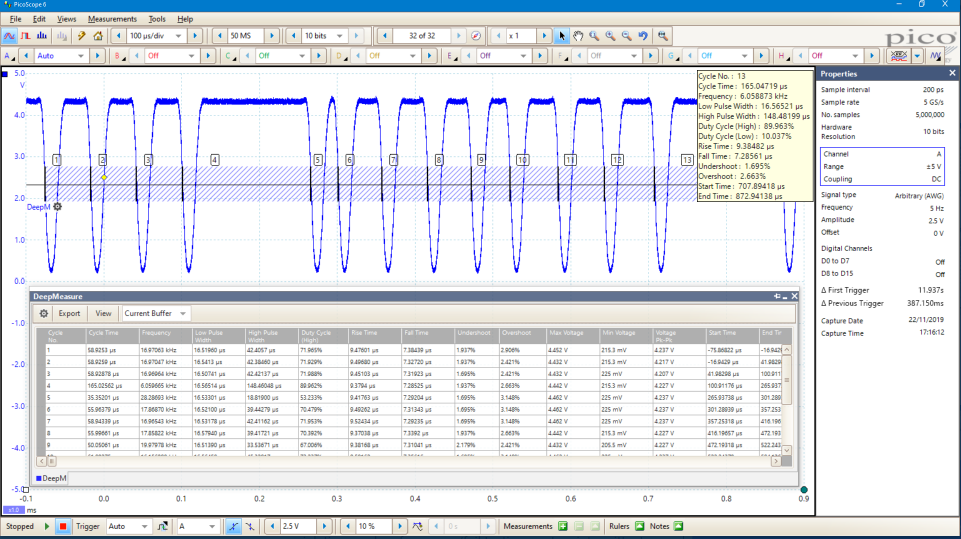
One waveform, millions of measurements.
Measurement of waveform pulses and cycles is key to verification of the performance of electrical and electronic devices.
DeepMeasure delivers automatic measurements of important waveform parameters on up to a million waveform cycles with each triggered acquisition. Results can be easily sorted, analyzed and correlated with the waveform display.
More information on DeepMeasure >>
Serial bus decoding and protocol analysis
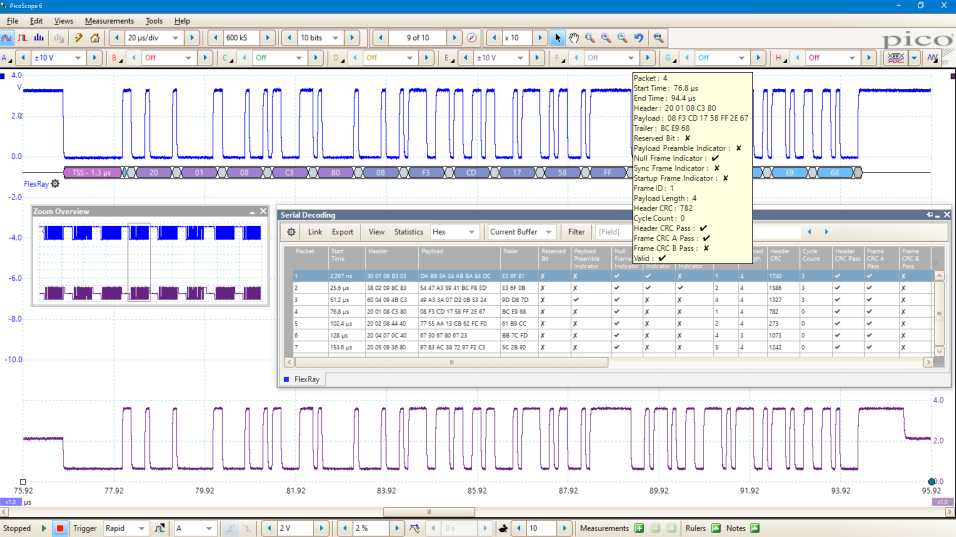
PicoScope can decode 1-Wire, ARINC 429, CAN & CAN FD, BroadR-Reach (100BASE-T1), DALI, DCC, DMX512, Ethernet 10Base-T and 100Base-TX, FlexRay, I²C, I²S, LIN, PS/2, Manchester, MODBUS, SENT, SPI, UART (RS-232 / RS-422 / RS-485), and USB 1.1 protocol data as standard, with more protocols in development and available in the future with free-of-charge software upgrades.
Graph format shows the decoded data (in hex, binary, decimal or ASCII) in a data bus timing format, beneath the waveform on a common time axis, with error frames marked in red. These frames can be zoomed to investigate noise or signal integrity issues.
Table format shows a list of the decoded frames, including the data and all flags and identifiers. You can set up filtering conditions to display only the frames you are interested in or search for frames with specified properties. The statistics option reveals more detail about the physical layer such as frame times and voltage levels. PicoScope can also import a spreadsheet to decode the data into user-defined text strings.
More information on Serial bus decoding and protocol analysis - overview >>
Hardware Acceleration Engine (HAL3)
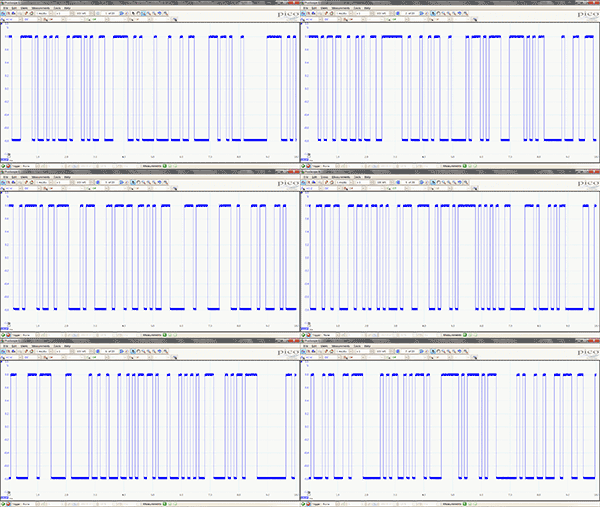
Some oscilloscopes struggle when you enable deep memory; the screen update rate slows and controls become unresponsive. The PicoScope 6407 avoids this limitation with use of a dedicated hardware acceleration engine inside the oscilloscope. Its massively parallel design effectively creates the waveform image to be displayed on the PC screen and allows the continuous capture and display to the screen of 2.5 billion samples every second.
PicoScope oscilloscopes manage deep memory better than competing oscilloscopes, both PC-based and benchtop.
The PicoScope 6000 Series is fitted with 3rd generation hardware acceleration (HAL3). This speeds up areas of operation such as allowing waveform update rates in excess of 130 000 waveforms per second and the segmented memory/rapid trigger modes. The hardware acceleration engine ensures that any concerns about the USB connection or PC processor performance being a bottleneck are eliminated.
130 000 waveforms per second
An important specification to understand when evaluating oscilloscope performance is the waveform update rate, which is expressed as waveforms per second. While the sample rate indicates how frequently the oscilloscope samples the input signal within one waveform, or cycle, the waveform capture rate refers to how quickly an oscilloscope acquires waveforms.
Oscilloscopes with high waveform capture rates provide better visual insight into signal behavior and dramatically increase the probability that the oscilloscope will quickly capture transient anomalies such as jitter, runt pulses and glitches – that you may not even know exist.
PicoScope oscilloscopes use hardware acceleration to achieve over 130 000 waveforms per second.
More information on Fast waveform update rates >>
Waveform buffer and navigator

Ever spotted a glitch on a waveform, but by the time you’ve stopped the scope it has gone? With PicoScope you no longer need to worry about missing glitches or other transient events. PicoScope can store the last ten thousand oscilloscope or spectrum waveforms in its circular waveform buffer.
The buffer navigator provides an efficient way of navigating and searching through waveforms, effectively letting you turn back time. Tools such as mask limit testing can also be used to scan through each waveform in the buffer looking for mask violations.
More information on Waveform buffer >>
High-end features as standard
Buying a PicoScope is not like making a purchase from other oscilloscope companies, where optional extras considerably increase the price. With our scopes, high-end features such as serial decoding, mask limit testing, advanced math channels, segmented memory, and a signal generator are all included in the price.
To protect your investment, both the PC software and firmware inside the scope can be updated. Pico Technology have a long history of providing new features for free through software downloads. We deliver on our promises of future enhancements year after year, unlike many other companies in the field. Users of our products reward us by becoming lifelong customers and frequently recommending us to their colleagues.
PicoScope 6407 Software
Advanced display
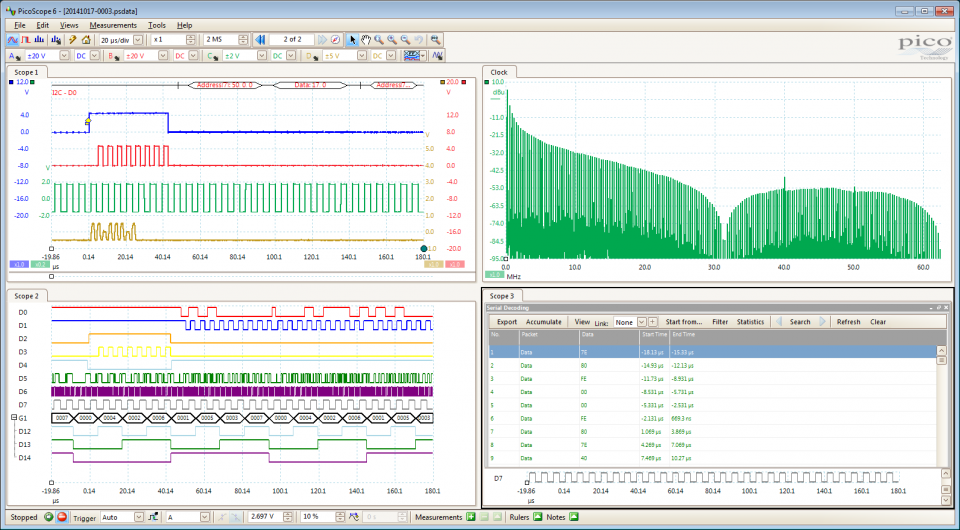
PicoScope software dedicates almost all of the display area to the waveform. This ensures that the maximum amount of data is seen at once. The viewing area is much bigger and of a higher resolution than with a traditional benchtop scope.
With a large display area available, you can also create a customizable split-screen display, and view multiple channels or different views of the same signal at the same time. As the example shows, the software can even show multiple oscilloscope and spectrum analyzer traces at once. Additionally, each waveform shown works with individual zoom, pan, and filter settings for ultimate flexibility.
The PicoScope software can be controlled by mouse, touchscreen or keyboard shortcuts.
Math channels and filters
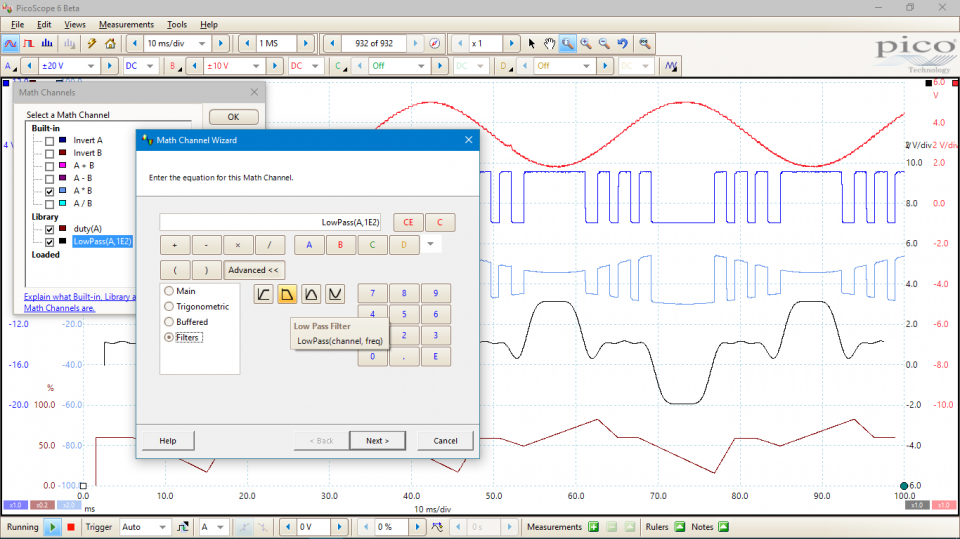
On many oscilloscopes waveform math just means simple calculations such as A B. With a PicoScope it means much, much more.
With PicoScope 6 you can select simple functions such as addition and inversion, or open the equation editor to create complex functions involving filters (lowpass, highpass, bandpass and bandstop filters), trigonometry, exponentials, logarithms, statistics, integrals and derivatives.
Waveform math also allows you to plot live signals alongside historic peak, averaged or filtered waveforms.
You can also use math channels to reveal new details in complex signals. An example would be to graph the changing duty cycle or frequency of your signal over time.
More information on Math channels >>
Alarms
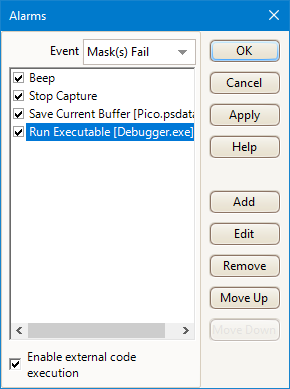
PicoScope can be programmed to execute actions when certain events occur.
The events that can trigger an alarm include mask limit fails, trigger events and buffers full.
The actions that PicoScope can execute include saving a file, playing a sound, executing a program or triggering the signal generator / AWG.
Alarms, coupled with mask limit testing, help create a powerful and time saving waveform monitoring tool. Capture a known good signal, auto generate a mask around it and then use the alarms to automatically save any waveform (complete with a time/date stamp) that does not meet specification.
Custom probes in PicoScope oscilloscope software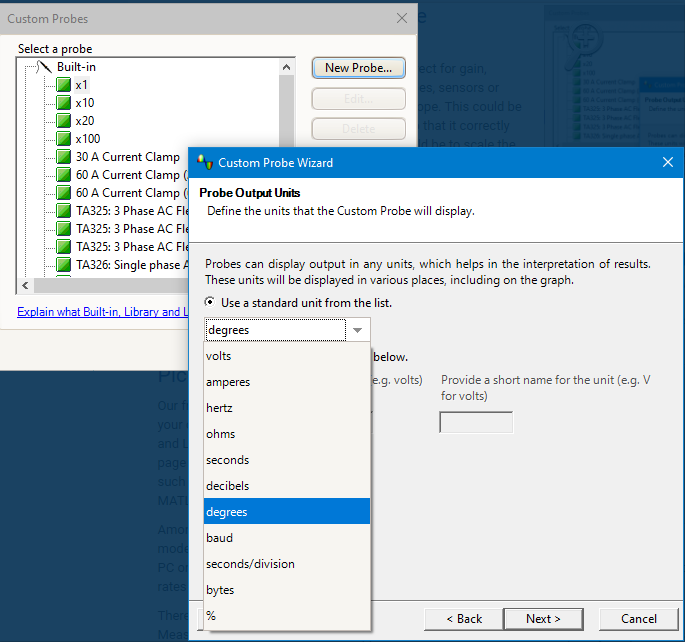
The custom probes feature allows you to correct for gain, attenuation, offsets and nonlinearities in probes, sensors or transducers that you connect to the oscilloscope. This could be used to scale the output of a current probe so that it correctly displays amperes. A more advanced use would be to scale the output of a nonlinear temperature sensor using the table lookup function.
Definitions for standard Pico-supplied oscilloscope probes and current clamps are included. User-created probes may be saved for later use.
Documents
| Resource |
Language |
Version |
Size |
Updated |
| Data Sheet: |
| PicoScope 6407 Digitizer Data Sheet |
English |
6 |
4 MB |
January 03 2017 |
| User’s Guides: |
| PicoScope 6407 Digitizer User’s Guide |
English |
1 |
576 KB |
April 18 2011 |
| PicoScope 6 User’s Guide |
English |
50 |
10 MB |
February 24 2020 |
| Quick Start Guides: |
| PicoScope USB Oscilloscope Quick Start Guide |
English
Français
Deutsch
Italiano
Español
中文 (简体)
한국어
日本語 |
20 |
4 MB |
January 10 2020 |
| Training Guides: |
| PicoScope 6 Frequently Asked Questions |
English |
4 |
949 KB |
April 08 2019 |
| PicoScope 6 Oscilloscope Software Training Manual |
English |
3 |
8 MB |
October 01 2014 |
| Beginner’s Guide to PicoScope |
English |
1 |
2 MB |
August 26 2014 |
| Declarations: |
| PicoScope 6407 EU Declaration of Conformity |
English |
1 |
299 KB |
March 17 2016 |
Specifications
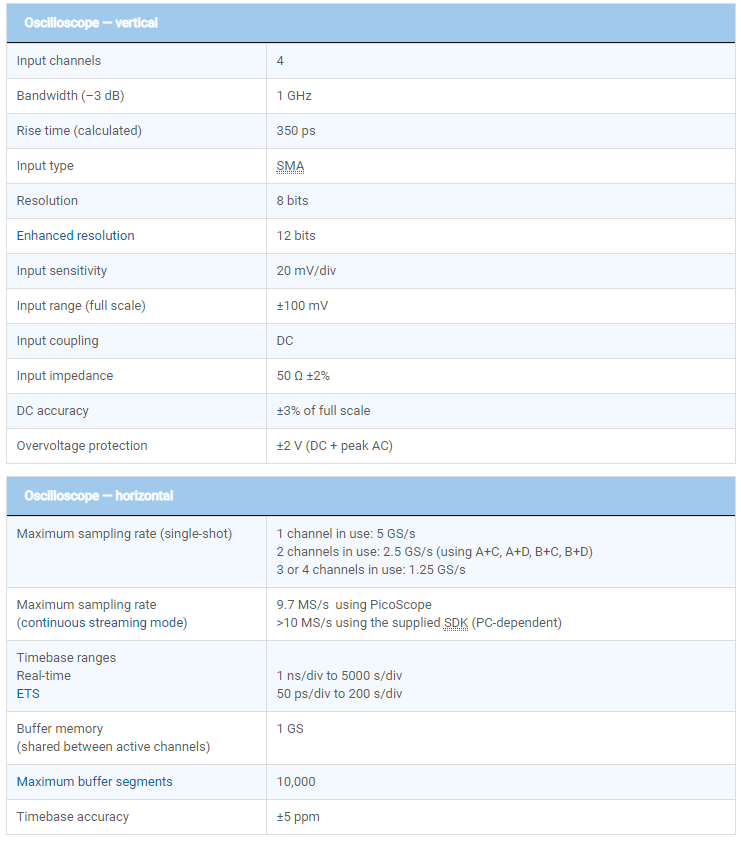
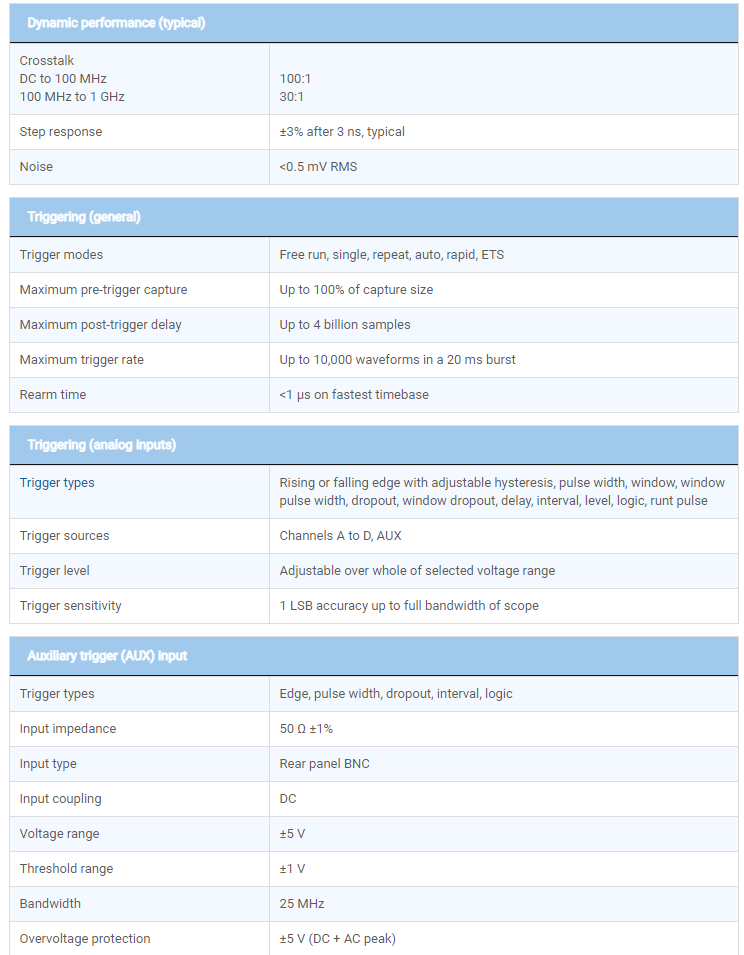
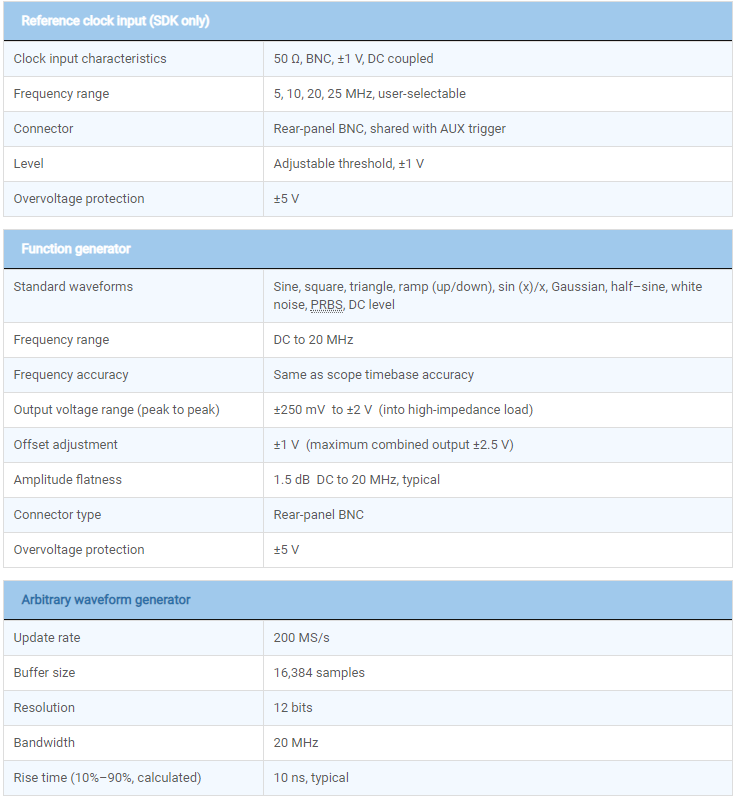
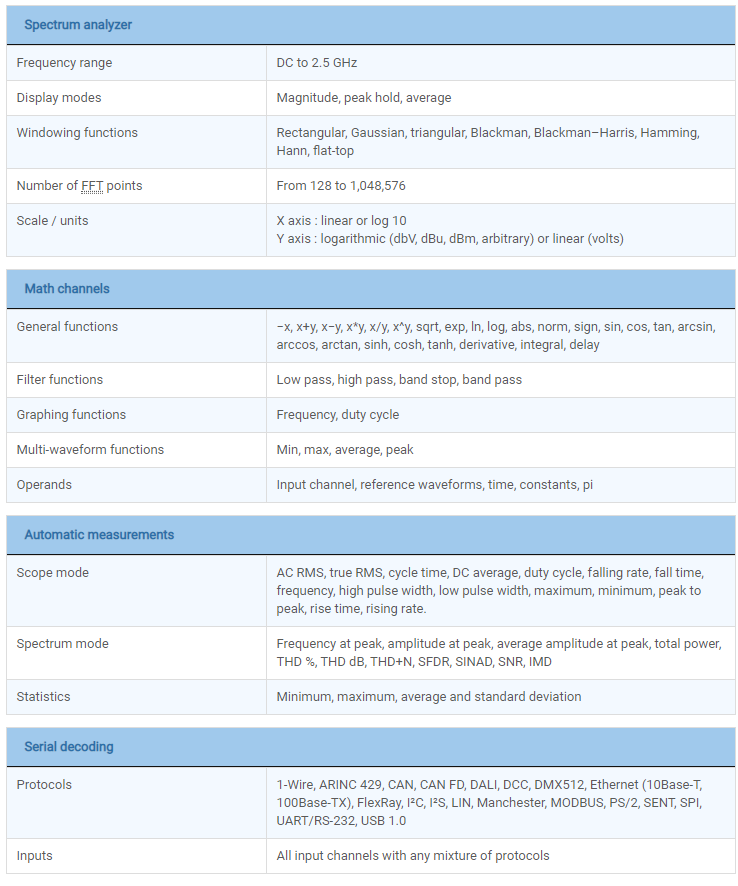
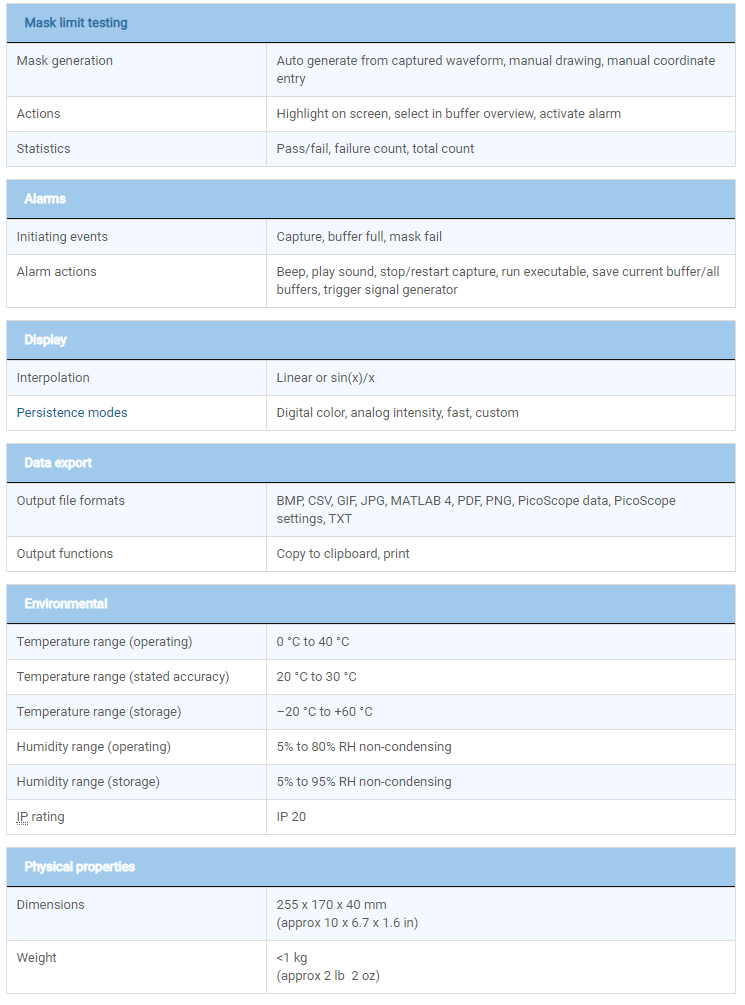
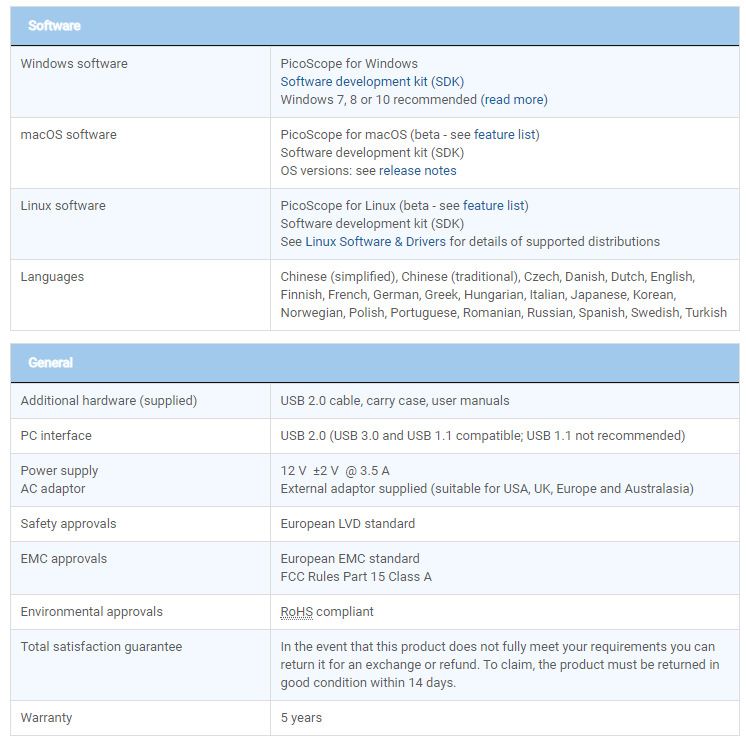
PicoScope 6407 Specifications
Order today!
PLEASE CALL [1-877-902-2979] US TO ORDER IF INTERESTED - MODEL IS NOW OBSOLETE
LIMITED QUANTITIES STILL AVAILABLE AT SEPT, 2021
|
|
|
|
|