Log In

GTCO Roll Up Digitizer RUD


 GTCO and PICO Forums


Go to this url to discuss and post questions to support and other users on this site.

Enter forum here!


pico logo


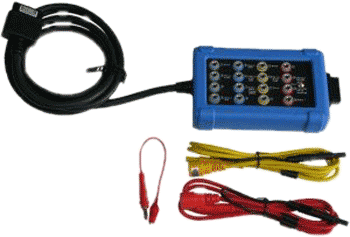
CAN Test Box

can test box


Continuing with our mission to make vehicle diagnostics easier and faster…the new CAN Test Box gives you easy access to the 16 pins of the diagnostic connector that is fitted to all modern vehicles. Depending on the configuration of the vehicle, this may allow you to check power, ground and CAN Bus signal quality. With the test leads supplied you can connect your PicoScope lab scope to the CAN Test Box to monitor signals such as the CAN High and Low. More.....

New tutorial Posted


1 New Tutorial
Posted

Fuse Box Diagnostics

We have just posted a new Automotive Tutorial in our education section.

This tutorial shows and explains how to use the fuse box to do your diagnostics. An Audi A8 is used here.........


You can view all our automotive tutorials here.........


Interworld Celebrating 33 Years
   

PicoScope Automotive 6

PicoScope Automotive 6 is the latest version of our PicoScope Automotive software.
Find out more about PicoScope 6 and download your FREE copy

PicoScope 5 Automotive Diagnostic Software - Replaced by Version 6

PicoScope oscilloscope software has been popular with automotive users since its launch; its ease of use, automated measurements and the ability to save and print waveforms have all added to its appeal.


PicoScope Automotive

For the Automotive Diagnostic Kit an extra drop down menu has been added to the original PicoScope software. The Automotive menu contains a list of the different sensors and circuits that can be tested with the Pico Automotive Diagnostic Kit. When the subject of interest has been selected the PicoScope software will automatically do a number of things:

  • A reference waveform will be loaded into PicoScope
  • A reference topic will be loaded. This shows you how to connect the scope, gives advice on what the waveform should look like and gives general technical information on the component being tested.
  • The required settings (trigger, timebase, voltage range) for PicoScope will automatically be loaded, eliminating the need to spend time setting up PicoScope.

With over 50 different reference topics on vehicle components and systems included as standard, using PicoScope Automotive is both fast and easy.

PicoScope Automotive 5 includes language support for English, French, German, Italian and Spanish. It is supplied as standard with all Pico Automotive Diagnostic Kits and automotive oscilloscopes.


PicoScope Automotive 6

PicoScope Automotive 6 is the latest version of our PicoScope Automotive software.
Find out more about PicoScope 6 and download your FREE copy


USA Office

Tel:1.877.902.2979-1.425.223.4311
Fax:1.877.329.4324
Address: PO Box 1280,
145 Tyee Drive
Point Roberts, WA 98281
sales@interworldusa.com
support@interworldusa.com

Western Canada - Vancouver BC

Tel:1.800.663.6001 or 1.604.925.6150
Fax:1.604.925.6170
Address: 2454 Haywood Ave
West Vancouver, BC V7V 1Y1
sales@interworldna.com
support@interworldna.com

Eastern Canada - Markham, Ontario

Tel:1.800.465.0164 or 1.905.513.7027
Fax:1.905.513.7029
Address: 3555 14th Ave, Unit 12,
Markham, Ontario L3R 0H5
salestor@interworld.ca
support@interworld.ca